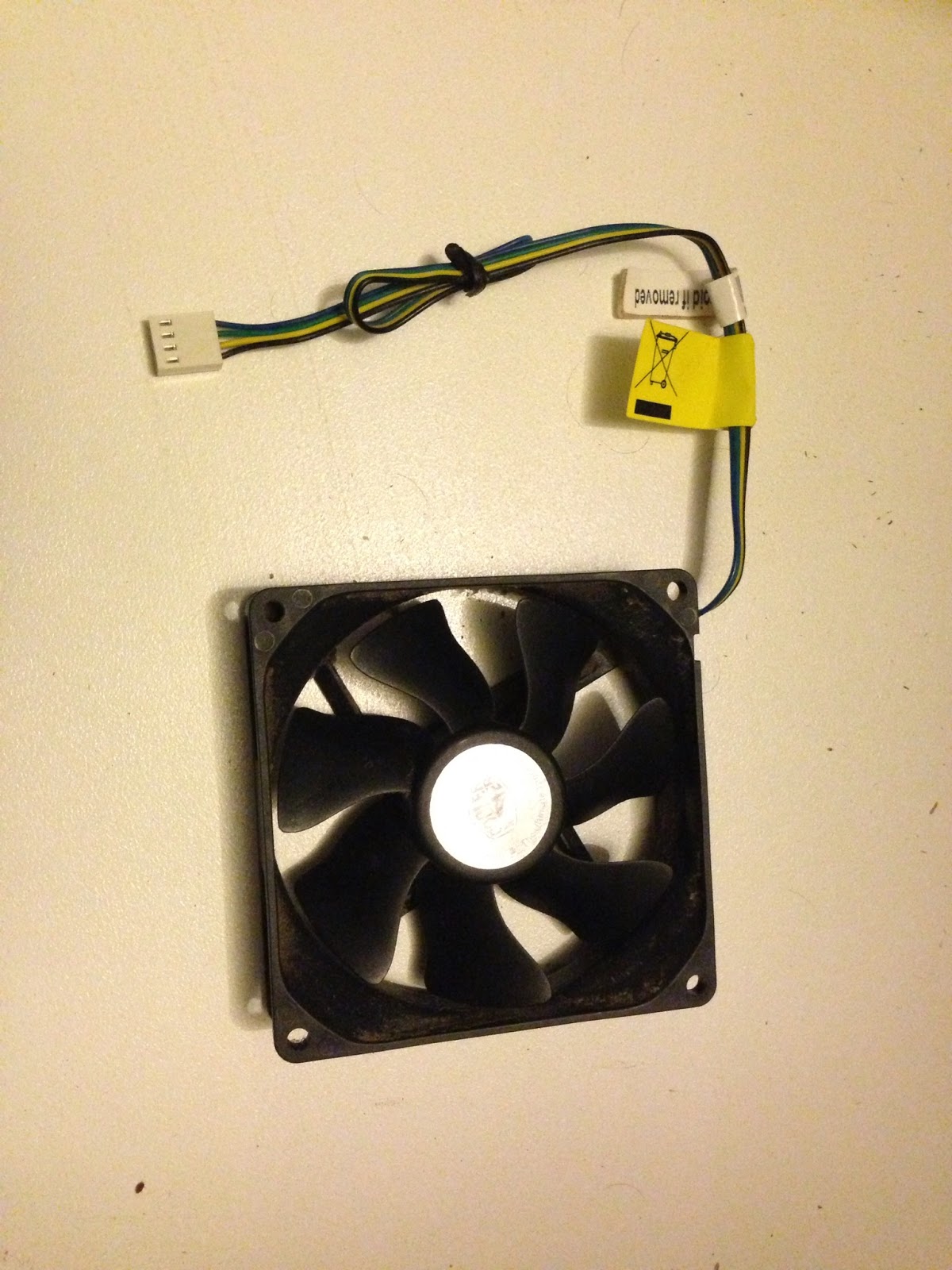
I came home Tuesday to a sorry tale of a beeping PC preventing Cam from enjoying the afternoon. It managed to start immediately for me, but after about an hour it blue screened and rebooted. One long continuous beep, several flashing HDD lights, then another long beep. Thinking it might be heat related I left it until after tea, but was still met by the death beep.
Tried the usual trick of reseating RAM & graphics card, but still the long beep kept coming up. Finally it looked like I found the culprit; the upgraded CPU cooling fan was no longer turning. It would make sense that the lack of RPMs reported by the CPU fan would give an alarm, but I thought it was a little drastic to disallow POST.
Over the next few days I tried to pin down a local replacement. Apparently 90mm fans are a little hard to come by compared to 80 or 120, but eventually I got one home today (5 days after it went down). A quick change of the latches to lock it to the Cooler Master Hyper TX3 radiator and I was good to go.
Almost.
Still beeping? Visions of a cooked CPU flooded my mind, along with the ramifications of being without a PC for an even longer period. I went back into diagnosis mode and hoped that memory or GPU had gone out in sympathy with the HSF. Changed out the memory and finally got the machine to POST to another beep code. Cool, memory it is.
Cleaned the contacts and inserted one of the G-Skill 4Gb memory sticks back in.
Success! No more POST errors.
Cleaned the other and replaced it too.
Success!
Looks like it was just a corroded contact, a popular outcome from living 50m from the beach. I'd thought I'd tested for that at the start, but it might have needed a good scrub and slot swap to kick it back into gear.
My suspicionss were also confirmed about the HSF not stopping the POST all on its own. I would expect a CPU heat sensor to finally halt progress after it had a chance to do work on boot, but not stop an attempt to start. How would they know that you weren't using a passive block, or water cooling with its own power system? Other pieces of the puzzle now fit too. The radiator was very hot to touch when the PC finally succumbed on Tuesday, and there had been a fan rattle for the past month or so that definitely sounded like the manual spinning of the defunct coolermaster fan. It would seem that the heat pump and radiator were enough to keep my PC going without the fan? Good news indeed. With the new fan it might even be worth overclocking before something else falls off.
Of more concern than the PC itself was the agitation that it caused me to not have a primary PC. Even though I had a sufficient laptop to do 90% of the games I'd likely play, that I have an iPhone and iPad for more casual retreats, that the game I've been waiting for still hasn't been delivered, and would have just as likely lounged in front of the TV for the same amount of time as I did, it still irks me when it's out of action.
This isn't the first time. There have been other occasions like this and it's the same feeling. Like something is missing, or wrong with the world, and I can't settle down and enjoy other pursuits. Typically this ends in a rather expensive bill and shipment of a shiny new PC. Thinking back it's not usually driven by an urgent need to play newly released game X, but to fill that PC shaped hole in my life and make the world right.
I lasted 5 days this time. Maybe I'm not as addicted as I have been ...
Showing posts with label Troubleshooting. Show all posts
Saturday, March 16, 2013
Sunday, April 08, 2012
ICS and Homegroups
While setting up a new wireless router network up at the farm, I had an odd bug where Windows 7 would not connect to the homegroup on the internal network. The reason seemed to be that the internal connection was set up automatically when I used ICS from the USB modem, and there was no default gateway on the new network. With no default gateway, Win7 would not allow the change of network type to 'home' (just remained as an unidentified network with public location).
Thanks to Sanoh for the insight into changing Win7 network type, and Ghost301 for his crossover cable ICS & Homegroup setup to confirm the process.
Thursday, July 29, 2010
Head to the Heart - Register ActiveX
I've continually come up with an issue while building the Head to the Heart powerpoint slides in my MSOffice 2007 Virtual Machine. It keeps complaining when I open it that an ActiveX is not registered, but doesn't say anything else past that. There are shockwave flash objects used in the powerpoint, but they visible on the slides as flash objects and listed as registered in the developer tab of ActiveX items. Seems tied to them though as the music or filmclips they should be bringing in disappear if you save the powerpoint once opened with the registration error.
Turns out Flash is NOT registered in Internet Explorer (since it's a custom VM just for Office), so the fix was to simply reinstall Flash into IE.
Friday, September 25, 2009
No sound on Windows 7 Virtual PC
Installed a Windows 7 virtual machine onto the barebones XP64 system here at work to test how it's going to go as a personal research environment. Installed fine, but had issues with virtual machine additions and sound. The fix for virtual machine additions was an upgrade to Virtual PC 2007 Service Pack 1. The new additions loaded fine, but still no sound? Not even a soundcard detected.
More googling revealed that the VM needed Vista as the chosen OS on install to set the correct sound driver. I knew this and had definitely set it up that way, but possibly SP1 reverted that change. Anyway, to remake the VM:
That done, I fired it up and it picked up the sound card, but couldn't install drivers for it. Seeing that the virtual hardware is the most generic available it must be something to do with how it is being displayed to the operating system. More googling showed that you may need to reinstall the virtual machine additions:
A couple more updates and I'll store this VM as a blank to base future W7 VMs off.
More googling revealed that the VM needed Vista as the chosen OS on install to set the correct sound driver. I knew this and had definitely set it up that way, but possibly SP1 reverted that change. Anyway, to remake the VM:
1. Run the wizard to create a new VM from inside Virtual PC 2007 SP1
2. Select "create a new virtual machine"
3. Name it as a new name (or v2 on the old name)
4. Select "Vista" as the operating system
5. Select "use an existing virtual hard disk" and point it to the VHD file of the old VM
That done, I fired it up and it picked up the sound card, but couldn't install drivers for it. Seeing that the virtual hardware is the most generic available it must be something to do with how it is being displayed to the operating system. More googling showed that you may need to reinstall the virtual machine additions:
1. Uninstall virtual machine additions
2. ignore any errors coming up about services being in use, they get cleaned up on the restart.
3. restart.
4. Install virtual machine additions again.
5. Restart.
6. Sound!
A couple more updates and I'll store this VM as a blank to base future W7 VMs off.
Tuesday, May 12, 2009
Tecra A10 blank screen on boot
The new laptops have a 'feature' that they automatically detect a connected monitor and send the signal to that on startup rather than to the laptop's monitor. In our situation we have the projectors hooked up to the laptops constantly, but the majority of the time (and especially on boot) the teachers are using the laptops as a laptop, not through the projector.
Finally found a way to turn this 'feature' off:
Access BIOS
1. Turn on computer by holding down power button while pressing the ESC key. The machine will beep, then display: Check System, then press F1
2. Release ESC key
3. Press F1 key
4. Go to the second page by pressing PageDown
5. In the Display setting, set to LCD+RGB instead of auto-select.
6 Press End to save and exit
Finally found a way to turn this 'feature' off:
Access BIOS
1. Turn on computer by holding down power button while pressing the ESC key. The machine will beep, then display: Check System, then press F1
2. Release ESC key
3. Press F1 key
4. Go to the second page by pressing PageDown
5. In the Display setting, set to LCD+RGB instead of auto-select.
6 Press End to save and exit
Wednesday, April 08, 2009
BzBzBzBzBzBzBzBz HDD
Another wired error with 2 student machines. They kept failing to load with either a black screen, a windows system error, Blue screen, or getting into windows after a very long time. Reghosting the machines seemed to work once or twice, but they'd invariably start their old trick again. Popped into the BIOS on one of them and noticed the 80Gb HDD being picked up as a 571Gb HDD called "BzBzBzBzBzBzBzBz".
It looked an easy sequence to google up, but there weren't any real answers apart from it's stuffed. (Even happening on an XBox, so there goes my theory of a virus).
Since it seemed to work sometimes I knew it wasn't totally fried, but it did indicate that it might be a physical issue. I opened up the case and saw that the SATA cable was jammed a bit into the slimline case. Replugging it into a more open SATA port on the mobo had it immediately detect and boot fine. Couple more tests to make sure it's not another red herring ...
It looked an easy sequence to google up, but there weren't any real answers apart from it's stuffed. (Even happening on an XBox, so there goes my theory of a virus).
Since it seemed to work sometimes I knew it wasn't totally fried, but it did indicate that it might be a physical issue. I opened up the case and saw that the SATA cable was jammed a bit into the slimline case. Replugging it into a more open SATA port on the mobo had it immediately detect and boot fine. Couple more tests to make sure it's not another red herring ...
Monday, April 06, 2009
Toshiba A10 BSOD on standby mode
Been tracking a particularly weird problem with the new A10's here at St Luke's: All seem to crash upon entering standby mode. An easy workaround was to turn off standby mode, except you can't do it as a normal user, so they all now have admin rights. Since it was also repeatable directly off Toshiba's XP downgrade disk, I poked around for a couple of weeks testing different combinations.
Finally found a solution that's repeatable: Disable all network cards in management console, then reboot, then re-enable them again. No idea why that would fix it. I was on my way to enabling them one at a time to see if it was a specific card, but once all of them were enabled and the problem was still gone, I tested it again on the SOE image and it definitely works.
Thursday, June 05, 2008
Cannot remove Mac created directory ending with space
Had a curly one at work today. A Mac user had created a directory stored onto the Windows 2003 fileserver with a space on the END. It first started appearing in the backup error reports stating the file didn't exist. When I finally got round to looking into it I found it was virtually impossible to remove from the server because the API must truncate the name. Couldn't delete through windows explorer, through DOS, through DOS as an 8.3 file, or brute forcing a delete on the whole directory.
Finally hopped onto a linux box and removed it with a simple "rm ._*" over a cifs share ...
Saturday, February 16, 2008
Close Speaker Phone Companion in System Tray
There are a few glitchy things with my computer at the moment, one is a "phone enhancement" icon that manages to garble my mic in TF2. Finally tracked a solution down via google:
"Close Speaker Phone Companion" in system tray? - Geeks to Go!:
And the answer ...
"Close Speaker Phone Companion" in system tray? - Geeks to Go!:
A small black phone icon appears in my system tray. It is an icon of a black rotory dial phone with the handset rising off the phone. When I scroll over it I see the message: "Close Speaker Phone Companion". Left click and the icon in the system tray disappears, right clicking does nothing.
And the answer ...
Ok. this icon is not a malware, or virus. It's an option you made playng with your sound card.
My sound card is a SoundMax. And detects when an aplication is using the microphone.
Here is what you have to do:
If you have SoundMax integrated soundcard, open the soundmax control panel. (you will find it in control panel, or the system tray. like a blue icon, with 'play' symbol on it
- Open the preferences and go to the microphone tab.
At the Microphone enhancements chose No filtering.
Subscribe to:
Posts (Atom)
