Showing posts with label MVC. Show all posts

Monday, August 24, 2015

TournamentCompare v0.002 - Enumerated Types in data first MVC

After tinkering with the controllers and views, I decided to look into a way to display the enumerated types used to set where the players were previously before this match. Ideally I wanted a radio control (as I had in Clarion), but the formatting eluded me for a super clean and simple implementation without losing data first design. In the end it turned out to be easier as a byte-stored enumerated type that can then be edited as a droplist.

Tournament Templates

One of the main parts of the program is to be able to put together any tournament format and then be able to run through thousands of tests to see the inherent bias of the tournament type. The tournament templates to be tested would then need to be anything from single elim, round robin, double elim, swiss, world cup rounds into single elim, etc. To achieve this, each tournament template would be a combination of TournamentTemplateMatches where each match accepts the 2 entering players from either the original player pool at the start of the tournament, another match previously held (Eg: single elim final match accepts the winners from the semifinals matches), a round robin subtournament, or an aggregator of previous scores to create a subtournament pool of ranked players.

Because each match could be pointing back to another match or another round (I'm assuming that subtournament aggregators can be handled by the round template with no rounds), I needed a concrete way of storing which type it was. Setting the PreviousType to "Match"would also mean that the PreviousMatchID is now valid, whereas if "Round"was the previous type then the PreviousRoundID would be valid.

Enumerated Types in data first MVC

Ideally I'd like to see in the database the type listed so that the data is a bit more human readable, but after investigation it seems that C# prefers integers or Bytes as the underlying enumerator value. I'd debated changing them to integers, but decided to use bytes instead (Tinyint in SQL) so that they appear as a different type in not to be confused with an ID. Changing the database wasn't too hard after manually changing the data to conform, then updating the field type in the designer.

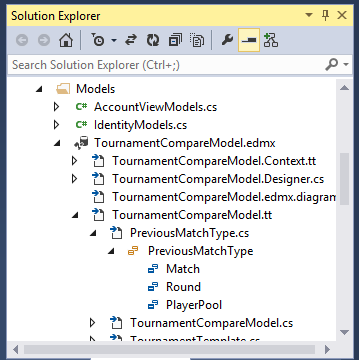
Because I want to continually bring in database changes, I was keen to find a way that left the enumeration types already bound. I'd initially added the types in as another model, but found out later that you can add them directly into the model designer of the database with a right click > add >  enum  or by adding it to the enum types in the model browser. You can then change the fields to the new enumerated type. Doing this way it maintains the enum inside the database design (and scope) and also doesn't drop the assignment of the enum when the database is reloaded.


The display fields handled the enum perfectly, but the editing fields treated it like a string. There was some additional code to manually change the @html.EditorFor() to a @Html.EnumDropDownFor(), but I really wanted to be able to regenerate the controllers and views for any data first changes, so eventually settled on adding a html helper to overload the EditorFor() when an enum is detected.


Friday, August 21, 2015

TournamentCompare 0.001

I've been weighing up what programming project to work on for a while. I had Factor Friends as the front runner, but the move to a facebook friends variant didn't pan out as facebook now only allows access to friends of friends to only those who have installed / run your application. In some ways it is sad that the original concept cannot be done, but at least it wasn't made completely redundant if I had finished it before the changed the API.

On to TournamentCompare. I have been meaning to return to the Designing a Tournament series of articles for a while and it's really at the stage where I need some actual stats to pull together some comparisons. I had written a tournament analysis program back in 2006 to do some of the bias analysis, but since then I'd lost the Clarion development environment and couldn't continue modifying it for non-perfect play. So, a total rewrite is in order and hopefully make it web based and accessible for others to vet and build their own tournament types.

After a bit of digging it seems that another MVC application should be pretty easy, but use bootstrap to help with the presentation and graphs. Even though code first EF design seems to be more prevalent these days, I'm still a stickler for getting the data right so I've stuck with data first design.

Starting off the app in Visual Studio 2013 was pretty easy following this data first tutorial, although I'd created the MVC app first before creating the database. VS 2013 now has the ability to immediately add a SQL database right into the MVC project and create / modify tables and data right from within Visual Studio. I'm impressed! Within 1/2 hr I had the first TournamentTemplate tables done and looked like getting the others completed was just a matter of time. Went back to the tutorial to build up the entity framework for the starting tables, but unfortunately a VS crash took out the project connectors. Since it was so early I dumped and recreated the project with only the database making its way into the new project. EF done. Checked a quick update of the DB to make sure the EF would also update, and it looks pretty good so far.


Sunday, August 05, 2012

Notoriously Databased v0.26

With the turn processing finished, Notoriously Databased was ready for limited testing. Unfortunately some conflicts with the online database made the LAN tests a bit of a flop, even though I'd been able to test a couple of turns myself locally. Debug phase ...

The first issue was that the cascade on delete that I'd set up locally hadn't been merged over very well. I tried fixing it with a diagram system, but it kept complaining about multiple cascade loops when it was only cascading downward from multiple parents. Wierd. It allowed it on manual update of the foreign key though.

Next issue was that partially filled submissions were causing null errors, so I zero'd out all the null fields at the start of processing. Later on I found out that Characters not submitting a turn was throwing errors too, so created a default blank submission for those. Some other small errors were isolated & fixed in a couple of hours.

Testing the turn processing was getting a little tedious when triggering the proces from the admin panel, so I moved it to the player's screen to keep it all together for now. It raised another problem I've been having with MVC and the modelessness of web design: there doesn't seem to be a built in way of returning back to the previous caller, rather it lets the currently active action determine where to go next. I can see why this might be the case, but it's such a radical shift from traditional functional design, I'm surprised that they haven't tackled it in some way. There are far more complex issues (like entity framework) that have been solved. Hopefully I'm just missing something simple, which is quite likely.

Another thing I wanted was a quick way to see the character's story.  Earlier changes to the controller and views made it quite simple to make a method receiveing the character's ID and only outputting those stories. Since it was only called from the player's screen, at least I didn't have to worry about the redirection on completion. Limiting the stories to those involving the character was one step, but I also needed to include all public stories as well. In SQL this would be a simple ID=x OR isPublic=1, but it took a while to figure out how an OR could be imoplemented. Many methods to do an AND, but only one looked like it could also be manipulated into being useful for an OR by simply using C# binary logic in the where() clause. It looks like Entity Framework does a nice job of processing the logic and converting it into an SQL statement. I haven't had to reduce entity framework to SQL queries just yet, although there have been a couple of wierd interfaces to do more or less the same job.

After the turn processing I thought it would be a good time so show the whole story of the turn to whoever processed it (as another debugging tool). Setting up another list was pretty easy, but unfortunately I couldn't trigger it easily with a RedirectToAction() passing a parameter to another controller, but it feels like returning to the Player's screen was a more concise alternative anyway, leaving individual turn debugging relegated to the admin panel.

It's feeling nice and solid. Now for some serious strategy testing ... 

With turn processing triggered of fthe admin panel, and


Thursday, August 02, 2012

Notoriously Databased v0.25

So much for esxprecting a fairly easy process to get the turn resolution complete. It's been over 15 hours, but finally is taking shape. Lots of effort in outputting stories as they will be the main interface for players to see what happened, and lots of code comments. I think it's teaching year 12 IPT that has made me comment more. It's a good thing, but adds time ...

Resolution Phases

  1. Validate the turn
  2. Town Raids.
  3. Hero attacks on Dungeon. 
  4. Attacks by other Characters.
  5. Returning trops.

Hero Attacks on the Dungeon

The main component of the game will be dealing with the escalating amount of heroes attempting to rid you from the world. in this section there's not too much to do. The Heroes' level will be dictated by the last turn's notoriety, or be found by a level 1 scout if no notoriety. The tricky part is absorbing the amount of damage to the fortifications and elites. I'd solved this earlier in the spreadsheet, but the different variable types made this a little interesting.

Attacks by other Characters

 When other characters attack, there is the chance that more than one will be attacking at the same time. If this is the case, they first all try to get past the fortifications, then combine strength to take on the dungeon. If there are any survivors they fight it out so that only one returns with the treasure. In the case of a draw (both sent the same amount of minions), the prisoners overpower them and escape back to the city. The outcome is that the dungeon is definitely wiped one way or another, and the attackers either havethe winning troops return or lose everything. Once again converting elite strength to overall strength and back again is a right royal pain, but having elites adds an additional way of spending money so I hope it'll be worth it.

Returning Troops

The raiding parties and attacks on other dungeons come back in this phase. Since there are data models set up to hold the results of these raids, it's simply a case of looking for any relevant data and integrating it to the next dungeon state.  There is also an opportunity to clean up the amount of minions ready for the next turn, dig out any new space, build any fortificaitons, or bring back the ransom.

Quite happy how the whole process turned out. Now to debug and make the stories more visible and enable a simple of triggering an end of turn.

Thursday, July 12, 2012

Notoriously Databased v0.24

The interface for submitting a turn is more or less complete, and I'm happy with the progress of MVC in this design. The next thing to work on is the turn resolution itself. Since I'd completed most of it in the Google Doc version, I was expecting it to flow fairly quickly...

Resolution Phases
For this version I'll be breaking down the turn resolution into 5 phases.
  1. Validate the turn: If there are any commands that will not be possible, drop to the maximum achievable number (Eg 5 minions available and request 6 to dig = 5 digging)
  2. Town Raids: Calculate all attacks on the town. Initially the attacks were to occur simultaneously and impact on the amount of guards for that turn, but for now a simple ratio of defenders to resources will suffice.
  3. Hero attacks on Dungeon: Process all incoming attacks from the village. 
  4. Attacks by other Characters: Any incoming attacks from other dungeon will occur after the hero attacks. This will allow for potentially easier attacks, but also potentially nothing if the heroes wipe it first. If there are multiple people attacking the same dungeon, only one will survive (or none)
  5. Returning trops: Any successful raids or ransoms or dungeon attacks come back. Any digging or fortification building is also completed if not wiped.

Validate the Turn
 The validation itself was pretty easy to set up as I'd already done the logic for it, but the main sticking point in this section was creating a function to update the story with any errors. The story table will mainly be used to tell the player what happened in a turn, but it will suffice to also be the error reporting section for validation. The function itself should be pretty easy, but where to put it?

After another chat with Andrew, I decided on using a StoryRepository in the Models. Even though it's not technically a Model, the utility function does in a way act as a conduit to the model, and will not be doing much else apart from formatting and saving the Story into a new record. I played around with null values to allow optional parameters and unknown IDs, but it was cleaner to simply force IDs by seeding the optional parameters.


Town Raids
Initially I was hoping for the amount of defenders to be proportional to the amount of attackers as they would be pulled in different directions to defend all the resources (or go only one way if only one attacker). In the Google Doc version I'd dropped it in favour of a simple ratio of defenders per resource becuase of difficulties calulating all town attacks at once, but now that I can process them any way I like, I'll still use the ratio for now because it turned out to be simpler to calculate whether your attack will workor not by analysing the village state from the previous turn. It seems a little too controleld at the moment and I'd like a little more randomness, but for this large scale test it should be fine.

Once the raid has been calculated, the successful minions will return in phase 5. I could possibly merge this phase down to there, or merge up into validation, but I'm really unsure whether the town raid will need a different calculation method in testing, so it should be better in a self-contained section. Doing this means that I need a way to hold all raid data until phase 5. With my new-found love of Models, I made up a new class to act as a memory storage unit for raid data. This way I can create them into lists and process in much the same way as if it were table data.

Wednesday, June 27, 2012

Nototriously Databased v0.23

With the Admin panel finished, it's time to start working the the player's UI. Ideally I'd like the user to log in and go directly to a list of all his characters in the various games. From there they should be able to:
 -  submit new turns
 - view the results of the previous turn
 - view their current dungeon state
 - view old turns
 - view public information for the whole game

PlayerController
Off to build a new controller. Most of the UI will be the same as the CharacterController for now, so it's a good one to pinch. Pretty easy < 2mins.

Limiting PlayerController
Looks pretty good, but is showing all characters, not the currently logged in user's characters. Since I haven't created the link between User and Account, I'll leave that for now and see if I can limit the list to a single ID.

After a number of false starts, it seems that grabbing everything from CharacterController wasn't as good as grabbing the extensions I did on UserController's edit action. Changed it over so that I could pass in a User model that is limited to the single ID and includes Characters.
User user = db.Users.Include("Characters").Single(u => u.UserID == 1);
return View(user);
Took a couple of hours of wrong turns and dead ends to get there, but at least it's working and looks pretty clean and simple. Now to change it to the logged in user...

Currently Logged In User
The intenetion of using the ASP.NET default account management was to make sure passwords etc were handled a little more securely than if I did it myself. The upshot of that choice meant that I'd make a User table that shadowed the account and use it to link all the game data to. Since I'd successfully added other tables when generating the creation of games, I set about modifying the AccountController to also give me a User record if they successfully registered.

Username and email were simple as they already existed in the Register action, but I'd also wanted to link the user table to the account using the guid. Try as I might, the standard code to return the logged in user's Id simply returns null:
Guid userGuid = (Guid)Membership.GetUser(User.Identity.Name).ProviderUserKey;
I'm assuming that the Register action has just created the account and they haven't actually logged in until exiting the action.

It would have been nice getting the account ID, but I'll have to suffice with the username. It'll be a little less secure, but fine for the scope of this little project. User record created and working!


Limiting to Logged In User
There should now be a User record for each account, and since the "User Info" page isn't visible until someone logs in, all I need to do now is find a way to get the current user. While searching for a way to get the account ID, there seemed to be a number of ways to get the current account name, so dropping back to username rather than ID has made this step rather easy:

User user = db.Users.Include("Characters").Single(u => u.Username == User.Identity.Name);  // assign currently logged in user
return View(user);
 Tidy up
Now that the page is working moderately well, I spent a little bit of time to rewrite the intro and remove / reword the character list fields to make it cleaner. All ready to make the submission...

Custom Data
For the next section I'll need to pass in some custom data to tell if the character is ready to submit a turn for their game. I might be able to do it in the view, but I confirmed through Andrew that it's definitely the controller's job to collect and prepare that sort of stuff. So how do I get it to the view when I am already passing in the User model along with associated Characters?

It seems that I need to create a separate model specifically for the view and pass in only the information that the view needs to display. I don't need all the Character fields, I do need some other fields from DungeonState and Game, and I also do need some custom variables to tell whether the turn needs to be submitted (or changed).

With Andrew's help, I made up a new ViewModel specifically for the Player controller with all the character information added as another class. In the end it felt more like creating a view in SQL from related data, but I could construct almost anything to put in there. A little bit of pre-work for a much more simple and clean implementation. I like it.

Now that the custom ViewModel is in place, I have to redo the way the Character table is laid out on the view. It needed a change anyway as I also took the opportunity to bring in all the data I'm expecting to show, as well as the IDs for all the relevant actions.  


Monday, June 25, 2012

Notoriously Databased v0.22

The next objective is to build an administration panel to link all the table controllers to. This will allow quick access to the game's internals in case the proper game fails.
  •  Added an AdminController with a simple list of table links.
  • Tested all links and found that CharacterSubmission controller failed due to pluralisation issues.
  • Fixed CharacterSubmission to CharacterSubmissions in the db, and rebuilt the model and controller.
Now some initial prep work on the game. If a new game is created, it would be best to have defaults set up immediately for VillageState and Turns.
  • Located the creation of game objects and added code for creating a new Turn object once successful
  • Reviewed changing ID fields for the new record, but it looks like it does that automatically once saved. 
  • Reviewed adding linked GameID fields from the original object. Does it pick up what the new ID field is once added? Yep, fantastic. Nice and easy.
  • To check that all the IDs are working, I redid the display view for Turns. Entity Framework is a treat for getting related data out. 
  • Formatted GameDate to Now() until I know when the game will be pitched at. 
  • Added VillageState object, linked to the current turn, and saved.  
All in all a pretty good night's programming (plus F1). Slowly coming to grips with MVC / EF / C# and it now feels like I can put together data onto the page where I like. Will still have a little work to prep for user account interaction, but hopefully it's only a Google away from a standard solution.

Friday, June 22, 2012

Notoriously Databased v0.21

Now that the tables and relationships were mapped out on paper, I then put them into a fresh database. Pretty easy after finding out some autoincrement foibles in the previous testing. 8 tables in all:


Users will have Characters inside each Game. The Characters will have CharacterSubmissions for each turn in what to do with their dungeon, which, once processed, is stored as the DungeonState. The Game will also revolve around a single village, that has VillageStates stored for each Turn. 

(Almost elemental facts, but meh ...)

Generating the App
Next step was to create the new MVC3 C# app. There were a number of steps that I needed memory jogging on, but I finally got the app set up with the database brought in by adding an ADO.NET Entity Data Model class to the Models directory. 

Account Control
The standard template came with ASP users and login hooked into a separate db, and not having to recreate login scripts and password obsfucation seemed like a good thing so I set about attempting to integrate it. Since the final version will be hosted online in AppHarbor using only one database, it seemed logical to bring all the ASP database tables into my own db and possibly link into the User table.

After some research it turns out that placing relationships onto the aspnet_user table is a bad thing in the long run, so I left the original tables as they were and added another field to handle linking to the unique ID. Hopefully I'll be able to link them together using API calls once the whole thing gets going. Creating the aspnet_ tables was relatively easy with aspnet_regsql , and apparently there's a lot more stored procedures that I would have missed if I tried to bring it over from the generated db file.

Once the db's had been merged, the next thing was to get the models to be merged. After a little bit of frustration, it seemed that the AccountModels didn't like accessing the aspnet files under the entity data model, so it was easier in the end to leave the connection string as a separate connection adressing the db with a simple SqlClient. The future problem will be that once I move it all to AppHarbor, it will only migrate one of the connection strings internally, so I'll have to manually update the ConnectionString to permenently point to the online db. Shouldn't be too much of a drama as there's not going to be much separation between production and testing.

Adding Controllers
User accounts complete! Adding controllers for the new tables worked relatively well once I figured out that the Data context class it was after was the complete NotoriousEntities class. Since I had added and removed it a couple of times, I had to restart VS 2010 to get it to pick it up. I'd heard that I should be able to refresh the database if it changed (because dropping the entity model and recreating is a pain) and once you double-click on the edmx file you can 'Update Model from Database..' from the NotoriousModel. Tested and working MUCH better.

Moving to AppHarbor.
I followed the general instructions to set up the new application, but finding the git info still needed a visit to the knowledge base. After previous tests with local git, I'd settled on integrating it into VS 2010.  Right click on the entire project in the project tree enabled me to start up a local git instance, then update it either with the Git Pending Changes addon, or straight to Git Bash. The shell will eventually be more useful, as once the remote git is set up I'll be constantly running the update and push commands. Update is nicer in the addon, but I can't see a push.

AppHarbor with SQL.  
It was easy to pick the free SQL shared server, but finding the details of the server to manually connect once again seemed harder than I remembered. There some new configuation variables that indicated a different method for connecting, but I finally found the options I needed by going to the SQL server. The connection string is going to be the main one to the entity model, and because of that it also needed the resource metadata to complete the connection string rewrite. After looking at the output, I pinched the ConnectionString data for the server itself and placed it over the account model connection. Seems to be working, but getting errors. Doh! no tables!

Once connected using SQL Server Management studio, the next task was to get all of the tables across. From the local database I could run a 'Generate Scripts..' task and point to all the tables. Hopefully the aspnet tables will be fine coming across as I'm pretty sure I won't be able to run aspnet_regsql over on the server.

Databases look good, but running the app looks like there's still issues. No stored procedures. Looks like I can output generation instruction for all stored procedures as a script in itself, and with a bit of massaging I got it to work. Now I need a schema :/.

Looks like I can get all the elements from generating scripts, so back to square one. Generating the complete database brings in too much database specific changes, so I tried picking all the items instead. Some ALTER ROLE scripts were ging to fail, but the rest seemed Ok so I merged them and manually added the role members using the GUI.

Still having issues with the schema, stating that it's an older, incompatible version; a task for another day ...   

EDIT: After a bit of Googling, it seems that the schema was fine, just aspnet requires some data to validate against. A quick merge of aspnet data files and it's all working. Now to build an integrated admin panel for manipulating the game data directly...


Friday, June 08, 2012

Notoriously Databased v0.2

After discussing with Andrew the benifits of MVC3 and AppHarbor, I was finally convinced that it was the way to go for the next step of developing Notorious. Hopefully it will allow a little more freedom in testing as I'll be able to fully automate the process and serve it up as a web app rather than Google Doc forms. Been a pretty long journey to get all the setup in place:

 - Looks like I'll need MVC3, EntityFramework, and AppHarbor testing
 - MVC3 needed Visual Studio 2010 sp1.  (250Mb)
 - Downloaded Windows Platform Installer to speed up the process. It was able to get most, but not entity Framework.
 - Tested MVC3 apps locally.
 - Downloaded GIT and merged local app to cloud
 - Needed to move data over to SQL, so downloaded 2012 SQL Management studio (600Mb)
 - Needs Windows 7 sp1, so it and another ~100 windows updates later ..
 - Management studio didn't seem to work by itself, so decided to move to 2012 express as well (200Mb)
 - Installed and running, and apparently management studio 2012 now magically works.
 - Played around with developing tables, and then merging them into MVC using entity frameworks. Lots of guidance by tutorials as this was not obvious. Eventual model first approach seems pretty slick rather than building LINQ.
 - Merged to cloud and then needed to figure out cloud connection. I could see the db fine in Management studio using the given user / pass, but couldn't connect to it using the app. finally figured out that it's rewriting the connection string itself. All I needed to do was to provide an alias to the model's connection string and also the resource metadata. 5 hours :/.
 - Looked at merging the data in case I neded to to that later on, but couldn't get a nice, simple way to do it across servers (I'm pretty sure the apharbour user doesn't have the right privelages for most options)
 - Ready to go!

3 days to get into a position to develop, and possibly 20 hours. Most of that was waiting for downloads, so maybe 8 hours in watching tutorials and testing stuff.

With all the tucked away, I spent 1/2 hr designing the table layout for the new NotoriouslyDatabased app. After building the guts of it on Google Docs, it's going to be pretty easy to convert the logic, but the file layout changes might mean a different approach is possible.